
| University | University of London (UOL) |
| Subject | CM2030 Graphics Programming |
CM2030 Assignment Brief
Introduction
During the course so far, we have developed a number of graphics applications using P5js. For this assignment you are tasked with developing a snooker app. You have to draw the snooker table with pockets, lines etc., add the balls and the cue. A standard fullsize snooker table measures 12 ft × 6 ft. Here you choose the size of the table in pixels, but you should maintain the ratio i.e., table width = table length / 2.
The ball size is approximately 2 inches in diameter so you could use the formula below ball diameter = table width / 36.
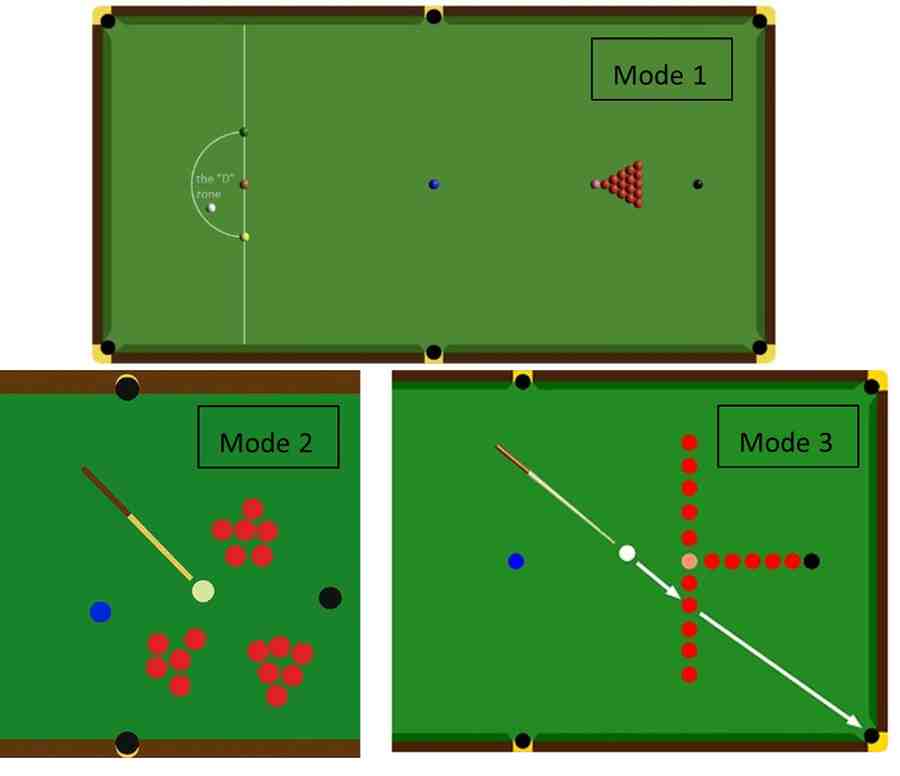
The pocket size should be 1.5 times the size of the ball’s diameter. The cue ball is only inserted in the “D” zone. Use the Snooker wiki (Snooker) for more detailed information so you can complete the table as seen below.
Task/Steps
1. Define your variables for the table, balls and the cue. Store the balls in appropriate arrays
2. Draw the snooker table in the middle of the canvas using the correct colours, pockets and lines as described above. A detailed table will receive higher marks
3. Draw the balls in three modes a) Mode 1: using keystroke “1”, b) Mode 2: random positions (for reds only) in clusters using keystroke “2”, c) Mode 3: practice mode (for reds only) using keystroke “3”. You should use nested loops and random functions. The coloured balls should also be present in the table.
4. Give all balls the necessary restitution (for bouncing) and friction (for slowing down). You are expected to use matter.js
5. Draw the cue. Here you have a few options: use the mouse, keyboard or a combination of them to draw and manipulate the cue so you can hit the cue ball. Top marks will be awarded when using both mouse and key interaction. Points will be reduced if the cue is acting as an elastic band. You are expected to use js and adjust the necessary parameters accordingly.
6. The cue ball is inserted (in the “D” zone) using human interaction as above, i.e. use the right combination of key/mouse etc. Points will be reduced if the cue ball is already in place at the start of the game or can be inserted outside the “D”.
7. Cushions should also have the necessary physics properties (i.e. restitution) for bouncing the balls (different from the ones the balls have). You are expected to use js
8. Animations and Visual Feedback. To enhance the visual appeal of your snooker app, implement the following animations. You will be assessed on how you use update and draw functions as well as for the final visual result.
a. Ball Trail Effect: When a ball moves, show a fading trail behind it to indicate speed and direction
b. Cue Impact: Animate a brief flash, or animated emanating circles effect when the cue strikes the cue ball. This should be localised near the impact
c. Pocket Entry: Animate the pocket when a ball is potted e.g. shrinking or fading out to indicate entry
Coding Style
1. Code presentation: use appropriate syntax, comments, consistent indentation and redundant code, including dead code and remnant debugging statements used for the video presentation
2. Code competency: use of object orientation, code reusability DRY principle, use of functions, correctly scoped variables global vs local
Extension
Since this is a creative module, we would like to give more marks for implementing further ideas. Also, you should write some words about it in the commentary (see next paragraph). Please note that we will award marks for the uniqueness of your extension and how technically challenging it appears to have been. Please note that we will not award any marks if you decide to develop the snooker app with scoring as this is not a unique extension. Try something novel or innovative that has not been seen in snooker gaming before. The extension is worth 20% of your mark.
Commentary
Explain the app design: e.g. why you used a mouse-based only cue function – how does it work? The report quality (i.e. language) will also be assessed. Also discuss your extension and why it is a unique idea. Be precise and deliver the information within 500 words. Include this in your main .js file.
Video Demo
Demonstrate your work using a video. Verbally go through all functionalities and your development decisions. More specifically your demo should include a) the three table modes as discussed in step 3; b) the ball trail effect; c) the cue impact animation; d) the pocket entry animation; e) any extension that you developed
Use OBS Studio or similar software and not your mobile phone and make sure you talk through your app during the demo. We will give zero points to this question if verbal discussion is missing or you are using your mobile phone to record the demo. The video should be up to 5 minutes long.
General Information
You should complete this work using the libs shown in the module. Do not use external code for this assignment. All your code and commentary will be checked for plagiarism/AI generation. Make sure your app runs without errors to receive full marks.
Submission Requirements
1. Compress all your code in .ZIP format and upload it in the first prompt
2. Upload the video demo in .mp4 format in the second prompt
3. Use alternative video submission link to upload the video demo to YouTube or similar, then submit the URL only in the third prompt
4. Merge all your .js code in a single file, then upload it in the last prompt. Use the JavaScript Bundler Tool (see previous learning item) to merge all your .js files into a single .txt file. Exclude any libraries you used such as p5.js, matter.js etc.
This is a submission requirement as we need this to run your code. You will receive zero points for the entire project if you fail to submit your code in this way.
CM2030 Assignment Rubric
1. Basic Functionality & Table Design (5)
2. Physics Implementation (7)
3. Control & Interaction: Cue and Cue ball (4)
4. Table Modes 1, 2, 3 (5)
5. Animations & Visual Feedback (9)
6. Code Quality (6)
7. Documentation & Demo (4)
8. Creative Extension (10)
🔹 Need Help With CM2030 Graphics Programming Assignments?
Native Singapore Writers Team
- 100% Plagiarism-Free Essay
- Highest Satisfaction Rate
- Free Revision
- On-Time Delivery
This assignment question is originally published by SingaporeAssignmentHelp.com.
CM2030 Graphics Programming assignments require students to combine creative design, physics-based interaction, and clean JavaScript coding within strict technical guidelines. At the University of London, assessors focus not only on visual output but also on code structure, originality, and correct use of libraries such as p5.js and matter.js. When managing complex features like table modes, animations, cue control, and extensions becomes challenging, programming assignment help can offer practical support. At Singapore Assignment Help, we provide 100% human-written, AI-free, and plagiarism-free assignments aligned with official rubrics. For confidence, you can review our expert-written computer and it assignment samples to see the quality delivered by our assignment help specialists.

Looking for Plagiarism free Answers for your college/ university Assignments.
- MNGT3012 Business Strategy Assignment Brief 2026 | The University of Newcastle
- MGT577 AI Concepts and Applications for Business Leaders End-of-Course Assessment 2026
- MGT564 Managing Digital Transformation in Operations End-of-Course Assessment 2026
- Organic Chemistry Homework Question 2026 | Nanyang Technological University
- BUS105 Statistics Assignment Tutor-Marked Assignment Questions 2026 | SUSS
- MKTG3000 Strategic Marketing Management Assessment Brief 2026 | UON
- AVET204 Animal Nutrition, Care & Behaviour Assignment Brief 2026 | TP
- NUR3506 Translation of Evidence into Practice Assessment 3, 2026 | NUS
- NUR3507 Clinical Practice Development Project Assignment Brief 2026 | NUS
- EGE202 Application Programming Assessment Project 2 2026 | Nanyang Polytechnic