
| University | Singapore University of Social Science (SUSS) |
| Subject | CET206: Full Stack Web Application Development |
CET206 TMA Questions
This assignment is based on the Staycation application.
Submit Question 1, 2a, 2b and 3 as a single flask application in a folder labelled Solution 1 and Question 2c as another flask application in a folder labelled Solution 2
Question 1
Explain your answer and supplement your explanation by lifting/commenting on the relevant source code in the Staycation application.
Question 1a
Using relevant code in the frontend and backend components, explain how WTForm is applied in the implementation of RegForm in the Staycation application. In particular, explain
the definition of RegForm
the application of RegForm in the frontend component
the delivery of data to the backend component
the successful/unsuccessful data retrieval by the backend component
the security features in the Staycation application through using WTForm
Question 1b
Redefine RegForm to include fields for:
a checkbox for “Remember Me” and
a submit button.
Re-implement the frontend and backend components to use the new RegForm.
Test that all existing functions are working as before but that now, RegForm also includes a checkbox field and a submit button, and these fields should be used by the frontend and backend components.
Show the relevant code segments, before and after the changes you make, and explain what the changes achieve and why the change is required. You must indicate the name of the file where the code segment is extracted from.
Question 2
Before working on this question, drop the collection booking.
Question 2a
Introduce a new field, status into the Booking class. Status can take either the value completed, cancelled or upcoming.
For a past booking (check-in date is before or on today’s date), status can either be completed or cancelled. For a future booking (after today’s date), status can either be upcoming or cancelled.
When a Booking is created and if no status is provided, assign status to completed when the check-in date is on or before today, and assign status to upcoming when the checkin date is after today.
Either add new method(s)/function(s) or update relevant method(s)/function(s) to
o accept an additional status as input parameter and
o return a list of bookings such that the status of bookings must also match the input status.
Update the Upload function so that when bookings are uploaded, their statuses reflect the statuses specified in the file, newBooking.csv.
Question 2b
Modify the Manage Booking function:
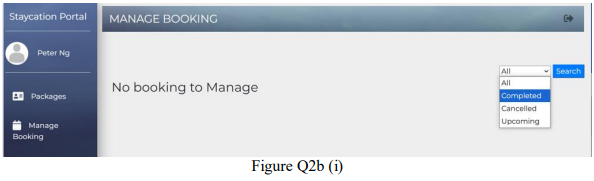
to let a user select a status category so that only the bookings with the selected status category are displayed. If there is no booking of a selected status category, show the message No booking to manage, as shown in Figure Q2b (i).
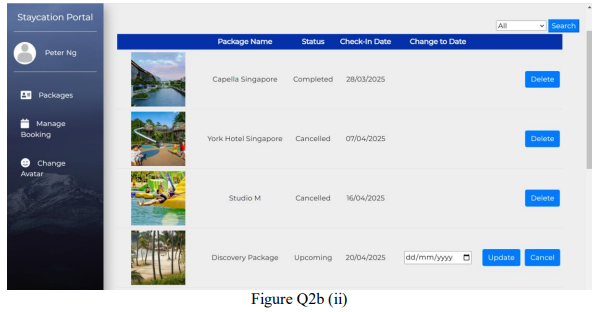
to display all bookings if the user selects the status category All as shown in Figure Q2b (ii), and to display only bookings of the selected status category if the user selects a specific status category.
to display each completed or cancelled booking without the update button as completed bookings and cancelled bookings can be deleted but not updated.
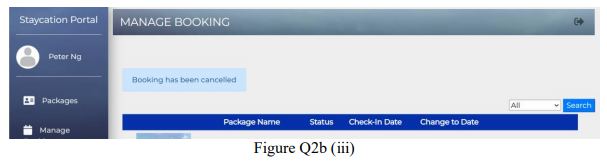
to display the upcoming bookings with both an update button and a cancel button. If the cancel button is clicked against an upcoming booking, update its status to “cancelled”. Display a message “Booking has been cancelled” if the cancel is successful and a message “Error cancelling booking” otherwise, as shown in Figure Q2b (iii).
Show the relevant code segments, before and after the changes you make, and explain what the changes achieve and why the change is required. You must indicate the name of the file where the code segment is extracted from.
Question 2c
Differentiate between a multi-page application and a single-page application. Re-implement Question 2b as a single-page application for these three buttons: Delete, Update and Cancel. Show the relevant code segments, before and after the changes you make, and explain what the changes achieve and why the change is required. You must indicate the name of the file where the code segment is extracted from.
Submit Question 2b and Question 2c as separate flask applications in different folders.
Question 3
For this question, you are to add a new chart for the admin user.
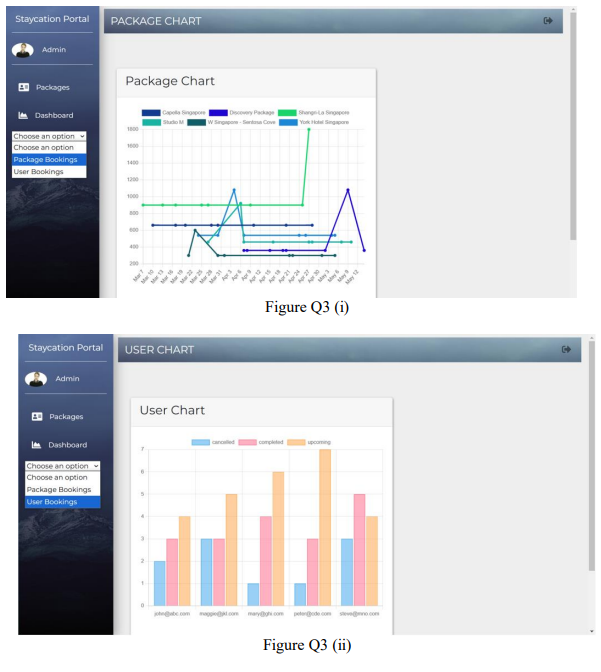
Modify the Dashboard hyperlink such that clicking on it has no effect. Instead, when a dropdown option is chosen, a relevant chart will show up.
If the admin user selects Package Bookings, the original trend chart will be displayed as shown in Figure Q3 (i).
If the admin user selects User Bookings, the bar chart will be displayed as shown in Figure Q3 (ii).
The bar chart is sorted according to the user email addresses, and will display the number of bookings cancelled, completed and upcoming for each user.
Struggling with CET206 CET206 Full Stack Web Application Development Assignment?
Native Singapore Writers Team
- 100% Plagiarism-Free Essay
- Highest Satisfaction Rate
- Free Revision
- On-Time Delivery
Many SUSS students find CET206 TMA challenging because it requires modifying Flask applications, handling WTForms, updating backend logic, and implementing status-based filtering with proper explanations. That’s why students rely on Singapore Assignment Help, where experts provide web application development assignment help aligned with SUSS grading criteria. We deliver 100% human-written, plagiarism-free solutions with clear code explanations and structured documentation. You can confidently use our programming assignment writing service for a customised solution. For quality assurance, explore our SUSS IT assignment samples.

Looking for Plagiarism free Answers for your college/ university Assignments.
- FILM1000 Introduction to Film Studies Assignment Brief 2026 | NTU
- 7WBS2011 Strategic Management Research Assignment Brief 2026 | PSB Academy
- HBC101 Understanding Contemporary Society: The Social and Behavioural Sciences TMA 01 2026 | SUSS
- SOC365 Popular Culture End-of-Course Assessment Question 2026 | SUSS
- BME317 Biomedical Devices Innovation Tutor-Marked Assignment 2026 | SUSS
- CU6027 Digital Marketing Report Assessment Brief 2026 | SUSS
- RBP020L062V Financial Performance Management Summative Assessment 2026
- ESE1008 Data Visualisation and Analytics Assessment Report 2026 | Temasek Polytechnic
- BUS100 Business Skills and Management Assignment Questions 2026 | SUSS
- COM101 Principles and Practice of Communication Tutor-Marked Assignment 02 2026 | SUSS